
If you’ve tried generating images with ChatGPT, you might have walked away thinking, “That’s pretty good. I still wouldn’t put it on my website.”
The lighting looks strange. The people look too perfect. Everything has that polished, slightly artificial finish. After a few attempts, you go back to searching for a stock photo.
I think a lot of business owners are judging image generation by results they could improve with clearer instructions.
And with what’s happening in the stock photography industry, it’s worth giving those instructions another look.
On October 12, Getty Images announced plans for a restructuring that would take the company private. On October 21, it filed for Chapter 11. Reuters reported the move followed the collapse of its planned Shutterstock merger, amid heavy debt and growing competition from AI-generated imagery.
Getty says it will continue operating normally. The restructuring includes commitments of up to $533 million in new equity from affiliates of the Getty family and Koch Equity Development, with completion expected by the end of 2026.
That’s a complicated business story. Reducing it to “AI killed Getty” would miss the debt, the failed merger, and the other pressures involved. But it does put a familiar expense under scrutiny: paying for an image because it’s the closest thing you can find to what you need.
You’ve probably done it. You need a photo for a website banner, so you scroll through pages of results. One has the right subject but the wrong colors. Another looks good until you crop it. The best option puts someone’s face exactly where your headline needs to go.
Eventually, you settle.
ChatGPT gives you another way to approach that problem. You can describe the image around the space it needs to fill, including the colors, lighting, subject placement, and room for text.
How well that works depends partly on how clearly you describe those choices.
“Make me a professional photo of a coffee shop” leaves a lot for the model to decide. It chooses the setting, the light, the furniture, the camera angle, and what “professional” means. You may end up with something that looks more like a showroom than the neighborhood business you had in mind.
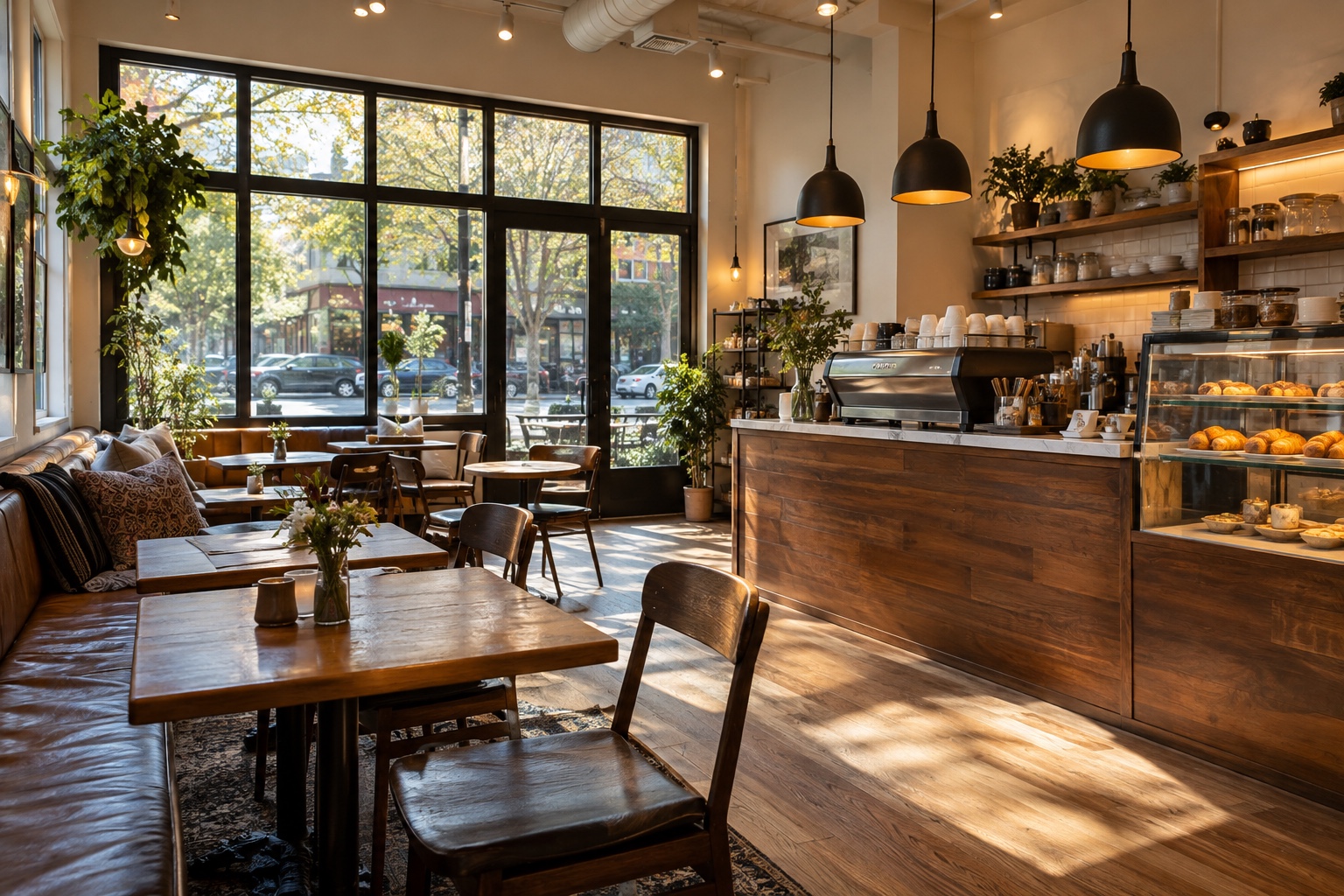
Generated with ChatGPT using the prompt: “Make me a professional photo of a coffee shop.”
Consider a more deliberate request:
Create a photorealistic image for a neighborhood coffee shop’s website banner. Show a ceramic coffee cup on a slightly worn oak table beside a window, with soft morning light coming from the right. Use warm cream and muted brown tones, natural shadows, and subtle surface imperfections. Place the cup in the right third of the image and leave the left side uncluttered for a headline. No text or logos.
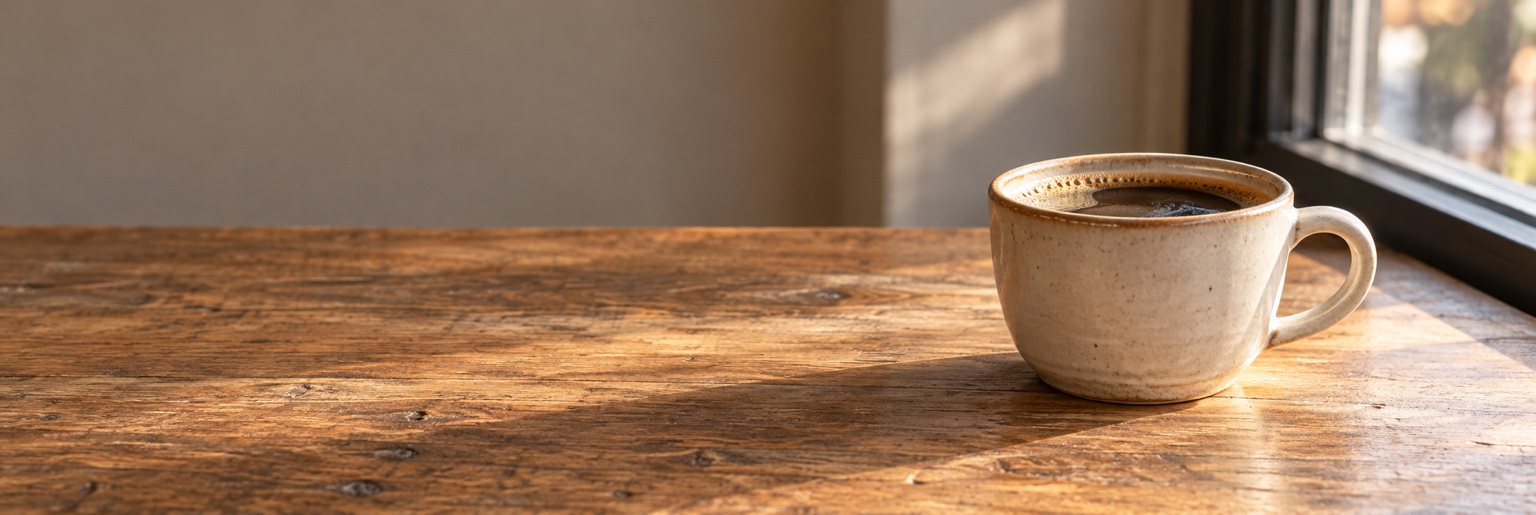
Generated with ChatGPT using the detailed prompt above.
With the more specific prompt, you can see finer details in the wood grain and speckled ceramic glaze, along with carefully directed light and open space for a headline.
That gives ChatGPT a purpose and a set of visible decisions to follow. It also gives you something specific to evaluate when the image comes back.
OpenAI’s own prompting guidance emphasizes clear descriptions of purpose, composition, lighting, texture, and constraints. You don’t need an enormous prompt or a string of technical buzzwords. You need to explain the details that determine whether the image will work.
You may still need revisions. A better prompt won’t guarantee a perfect image, and some requests will expose the model’s limits. But “move the cup farther right and soften the shadows while preserving the rest” gives you a more useful next step than repeatedly asking it to “make it better.”
For a business owner, that can mean less time wrestling with an image that almost fits.
A social post needs a square crop. A website banner needs room for a headline. A seasonal promotion needs colors that belong with the rest of your brand. Those are practical requirements you can learn to communicate.
I expect stock photography to face increasing pressure in this part of the market: generic, illustrative images used to support an idea. A business that needs a background for a blog post may find a generated image suitable for the job.
Photography that documents something real serves a different purpose. Your actual team, your finished work, your restaurant’s food, a wedding, or a news event deserves images of what happened. A generated scene can’t provide that record. Professional photographers also bring judgment, relationships, and creative direction that a prompt doesn’t replace.
For small businesses, I see a useful mix ahead: real photography to show who you are and what you do, with generated visuals helping illustrate the ideas around it.
That makes image prompting a practical skill to learn.
I’ve spent years studying OpenAI’s models, and the information behind my guide includes guidance shared with me by OpenAI developers. I created Create Better Images with ChatGPT through Twin Lakes Web Co. to make that knowledge easier for beginners to understand and use.
If you’ve been curious about image generation but frustrated with the results, I wrote it with you in mind.
You don’t need to become an AI researcher to describe what you want. You need a clearer way to turn the picture in your head into instructions ChatGPT can follow.
Before you spend another evening searching for a stock photo that almost works, learn how to ask for an image designed around your needs.
Get Create Better Images with ChatGPT.
Sources: